Monday, October 31, 2011

Andy Warhol

Within what art genre did Warhol work?
Pop Art.
Define the genre?

Art based on modern popular culture and the mass media.
During what years was he alive?
1928-1987
Post 2 samples of his art. Answer the following questions for each piece.
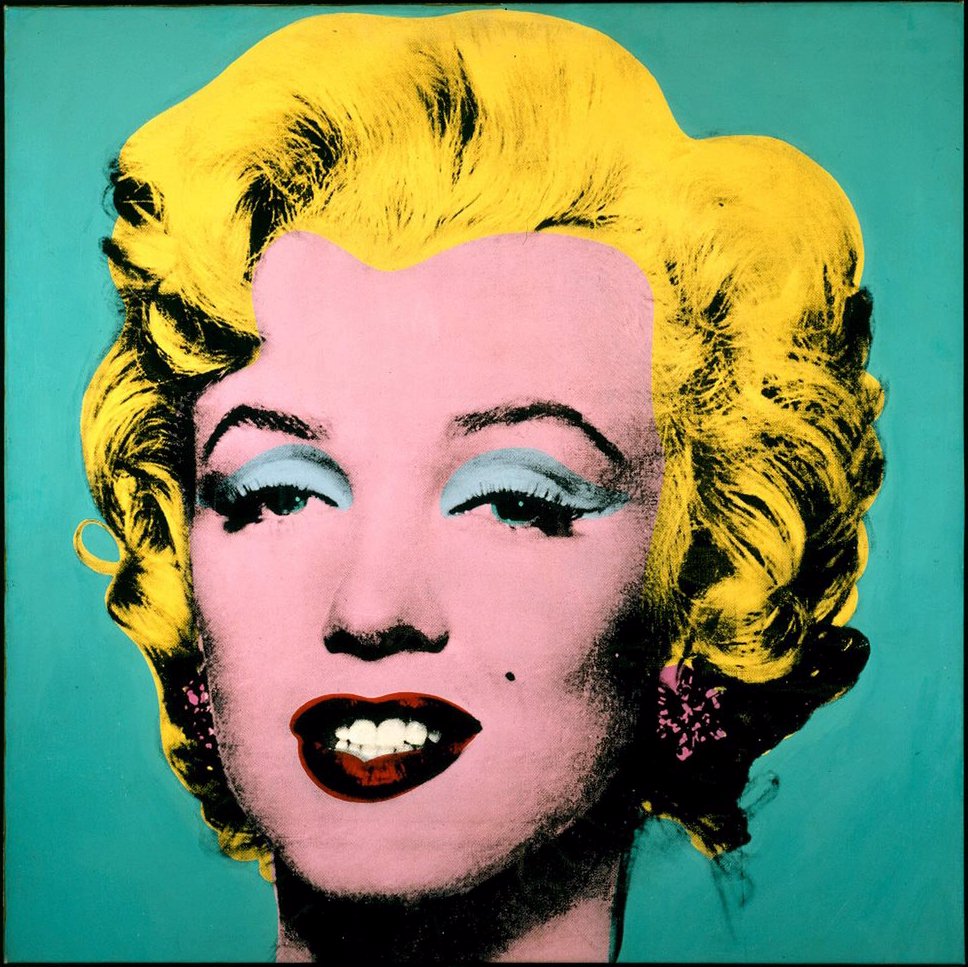
Marilyn Monroe


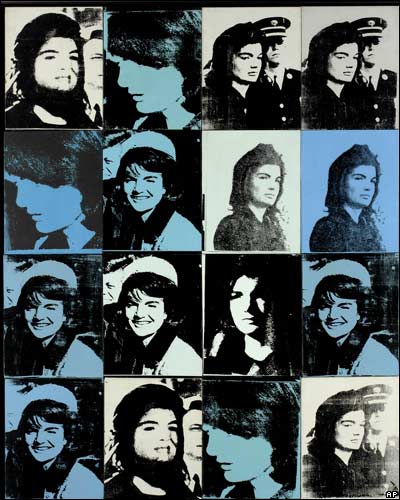
Jackie Kennedy 


Describe the color that he utilizes. Does he use any particular color scheme?
He uses the same colors through out the Jackie pop art, they are monochromatic. Marilyn uses yellow, blue, and red. That is triadic.
What do you notice about the artwork itself?
It stands out, you can only see their faces.

Friday, October 21, 2011

01.jpg
Complementary
02.jpg
Analogous
03.jpg
Monochromatic
04.jpg
Split Complementary
05.gif
Triadic

Review Week 9

Compare and contrast vector graphics and pixel images.
Pixel images are based off the construction of pixels and depend on resolution. Vector graphics are made of a mathematical equation and are not dependent of resolution, constructed by lines, shapes and curves.
What resolution is necessary to print raster images?
Usually 300 pixels.
What resolution is necessary to display raster images on the internet?

72 pixels

Friday, October 7, 2011

Review Week 8

Why must designers pay close attention to how color is utilized within a composition?
Color can make a piece or ruin it. For me, it's color that draws me to a design. Different colors also mean different things or make you feel a certain way, so you want to have the right color.

Why is the color wheel an important tool for graphic designers?
The color wheel is a tool that all artists have used to match colors and also goes along with the color theory which is important for artists.

Find an example of neutral colors utilized within a design (hint: google poster design). Near the sample, discuss why you feel the designer included neutral colors within the composition. 

There aren't many neutral colors on the poster besides the background. I think the designer made the background neutral so everything else will stand out and catch you eye. 

Briefly describe how we "see" the color of an object?
Colors are either absorbed or reflected. We see the colors reflected by light. 

Podcast #2 Color Theory

The right use of color can do what?
maximize productivity, minimize visual fatigue, and relax the body
Within the electromagnetic spectrum, which waves allow us to see color?
visible light
Describe white light?
it is equal parts of all colors in visible light spectrum
How do we see color if objects "have no color of their own"?
Light hits an object, the color reflects back to our eyes and that's what we see. All the other colors are absorbed.
What is a glass prism?
a transparent triangular object that breaks white light into all colors
What seven colors result when white light is refracted through a prism?
red, orange yellow, green, blue, indigo, and violet
Describe hue?
The actual color we see.
When does white light occur?
When all the the wavelengths reflect back your eye
When does black light occur?
when no light is reflected back to your eye
How color is perceived depends on what?
the type of light it is seen with
What is a color wheel?
a visual tool that shoes the relationship between primary, secondary, and tertiary colors

What are primary colors? Name them?
Red, yellow and Blue. 3 basic colors that can be mixed to make other colors.
What are secondary colors? Name them?
Orange, green, violet. Result form mixing primary colors.
What are tertiary colors? Name them?
Red-orange, yellow-orange, yellow-green, blue-green, blue violet, and red violet. Result of one primary and one secondary mixed together.
What are neutral colors? How can they be created?
Black, grays, whites and browns. They can be created by mixing complementary colors which neutralize them.
How can a neutral color help a design?
Can help promote and emphasize other colors.
What are complementary colors? Name them?
colors positioned opposite of each other on the color wheel
What is color value?
lightness or darkness of a hue or color
What is a shade?
adding black to color producing a low-value color
What is a tint?
adding white to a color to produce a high-value color
What is saturation/intensity?
a brightness of color
What happens when you mix complementary colors together?
you create a dull tone
Describe color harmony?
a pleasing arrangement of parts. ex. music, poetry, color.
What is a color scheme?
harmonious color combinations used to create style and appeal
Describe a monochromatic color scheme?
uses tints and shades of one color, clean and elegant, easy to the eye
Describe an analogous color scheme?
uses 3 colors adjacent to each other on the color wheel

Describe a complementary color scheme?
uses 2 colors opposite of each other on the color wheel
Describe a split-complementary color scheme?
uses 3 colors, 1 color, 2 adjacent to its complementary
Describe a triadic color scheme?
uses 3 evenly spaced around the color wheel
What colors are considered to be warm colors?
yellow, orange red
Describe a warm color scheme?
expresses aggression, excitement, and danger.
What colors are considered to be cool colors?
greens, blues, violets
Describe a cool color scheme?
soothing i nature, gives impression of calm
Why is important to consider which colors are being used within a design?
thik about how the colors are percieved
Friday, September 23, 2011

Review Week 6

What is the pen tool used for? The pen tool places anchors on a path that creates an object eventually. You can use the pen tool when tracing or just drawing an object.
How can you manipulate a path/line in Illustrator? Discuss the use of the white arrow tool, pen+, pen-, and convert too. If you need to manipulate a line that you have drawn with the pin tool you and use the pen+ or the pen- tool. The pen+ allows you to create extra anchors on a line, which, in turn lets you manipulate the line to curve more, be straighter, become longer, etc. The pen- tool allows you to delete anchors on a line. You can use this tool to shorten a line or move a line a certain way. In order to add or delete anchors though, you must use the white arrow tool. When manipulating a line after adding or deleting anchors you also have to use the white arrow too. The conversion tool allows you to convert a corner point into a curved point.

How can you utilize the layers palette in Illustrator? You can use layers when tracing an object. Whatever you're tracing from can be locked on the layers palette so it doesn't move while you are tracing on it.

How do you create a clipping mask in Adobe Illustrator? To create a clipping mask you first draw a square around the object. Then you select the object and bring it to the front so it is on top of what you're tracing. Then you go to make clipping mask.